 Golam Shahrier
NDC API integration is the work of connecting your booking platform to airlines’ NDC channels — IATA’s New Distribution Capability standard — so you can shop the airline’s own offers, add bags and seats, create orders and service them. You can integrate with each airline directly, take NDC content through a GDS, or connect once to an aggregator such as Tripgic, which blends airline NDC offers with GDS and 100+ low-cost fares in one normalized response.
This guide walks through the integration step by step: the three routes, the NDC message flow, how offers and orders change your data model, the mapping work, testing, servicing, timeline and team. For what NDC is and which airlines use it, see NDC in airlines; for how it compares with the GDS, NDC vs GDS.
Three Routes to NDC Content
| Route | What you integrate with | Effort | Best for |
|---|---|---|---|
| Direct to each airline | The airline’s own NDC API | High, per airline | High-volume sellers focused on a few airlines |
| Through a GDS | Your GDS’s NDC-enabled APIs | Medium; you see what the GDS passes through | Agencies already on a GDS |
| Through an aggregator | One API that already holds airline NDC connections | Low; once | Most OTAs, agencies, B2B platforms and startups |
The route decides almost everything that follows: how many schemas you handle, how many agreements you sign, and how much servicing you build. Decide it before anyone writes code, because changing route halfway means rebuilding the parts that took longest. Many sellers combine routes — an aggregator for breadth, a direct connection for one airline that matters most.
The NDC Message Flow
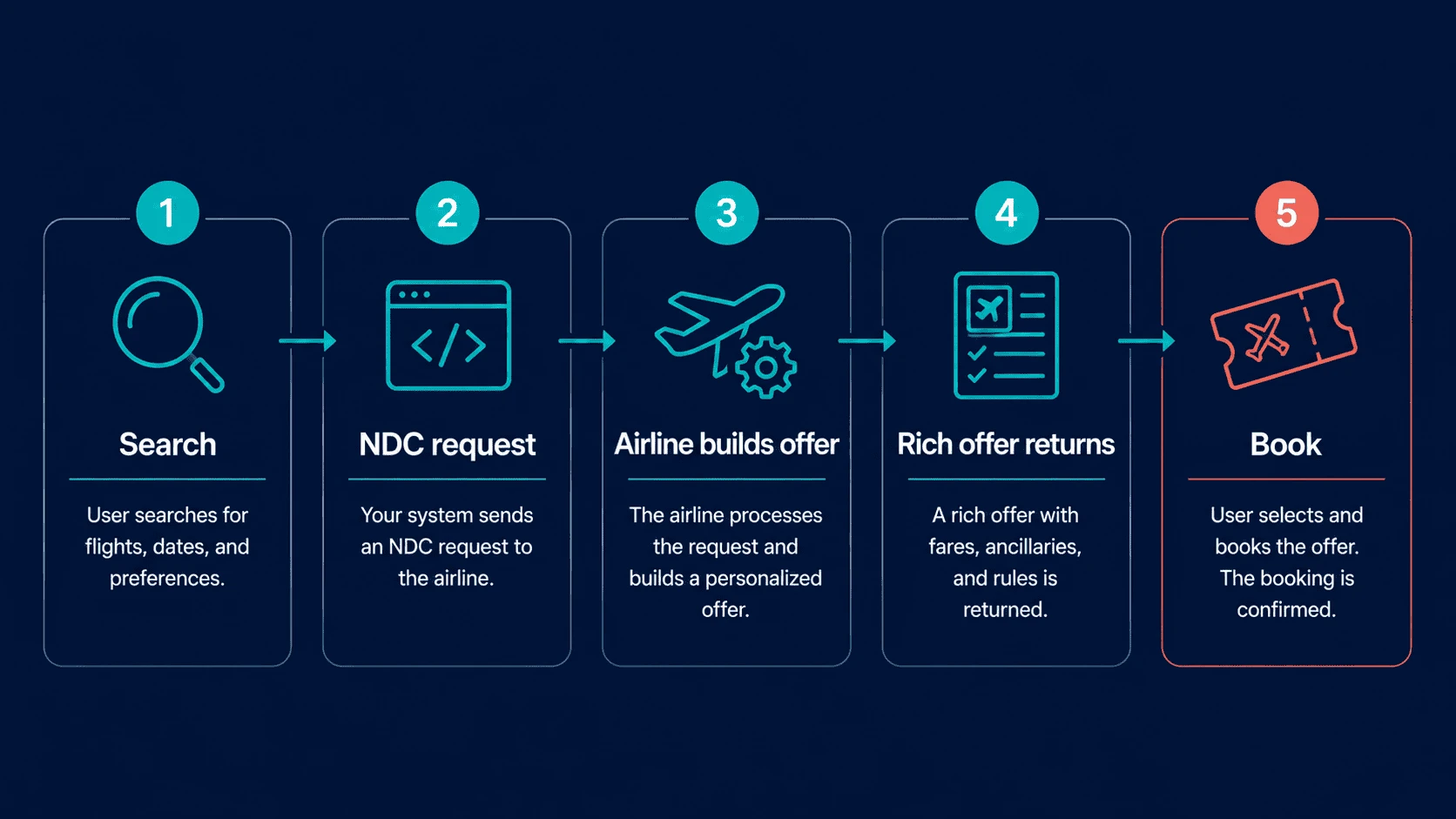
NDC is built from request-and-response message pairs. Names vary slightly between schema versions, but the core flow is consistent:
| Step | Message | What it does |
|---|---|---|
| 1. Shop | AirShopping | Returns the airline’s offers for a route, dates and passengers |
| 2. Price | OfferPrice | Confirms the price and conditions of a chosen offer |
| 3. Extras | ServiceList | Lists paid services such as bags, meals and priority boarding |
| 4. Seats | SeatAvailability | Returns the seat map and seat prices |
| 5. Book | OrderCreate | Turns the offer into an order |
| 6. Look up | OrderRetrieve | Returns the current state of the order |
| 7. Change | OrderReshop, then OrderChange | Finds new options and applies a change |
| 8. Cancel | OrderCancel | Cancels the order under the airline’s rules |
Through an aggregator you rarely call these messages yourself; the aggregator exposes them as its own API calls — search, branded fares, validate, booking, extras, ticketing and cancellation — and handles the airline-specific NDC underneath.
A Worked Example: From Shopping to Order
Follow one booking through a direct NDC connection to a single airline.
- Shop. A traveller searches a return flight for two adults. Your platform sends AirShopping; the airline returns six offers — three fare families on each of two flight combinations — each with an offer identifier and an expiry time.
- Choose. The traveller picks the standard fare with one checked bag each. Your platform shows what the fare includes, taken from the offer itself.
- Add seats. SeatAvailability returns the seat map; the traveller picks two seats together, priced inside the offer.
- Price. Before payment, OfferPrice confirms the offer — fare, bag and seats — is still available at the shown price. It is, so checkout continues.
- Order. OrderCreate turns the offer into an order. The airline returns an order identifier, the items it contains and their status.
- Ticket. Payment and ticketing follow the airline’s process; on some airlines this happens in the same step.
- Change. A week later the traveller moves the return flight. OrderReshop finds new options with the change price; OrderChange applies the chosen one.
- Look up. At any time, OrderRetrieve returns the order as the airline holds it — which is what your support team should see.
Now imagine repeating that for ten airlines, each with its own schema version, codes and behaviour. That is the scale of a direct multi-airline NDC project — and the work an aggregator has already done.
Offers and Orders: What Changes in Your Data Model
NDC is not just a different API; it is a different way of selling. Two ideas matter most.
Offers expire
An NDC offer is the airline’s proposal for a specific request. It has an identifier and a limited life. If the traveller takes too long, the offer may expire and the price must be checked again. Your platform must:
- Store the offer and its items as the airline sent them.
- Track when it expires.
- Re-price with OfferPrice before payment, every time.
Orders replace the PNR-and-ticket model
After booking, the airline holds an order: one record with flights, passengers and paid services. Changes and cancellations happen against that order. Your platform must:
- Store the order identifier and its items, not just a booking reference.
- Retrieve the order to show its current state, rather than trusting your own copy.
- Handle changes the airline makes — schedule changes and cancellations — as updates to the order.
If your platform also sells GDS fares, it will hold both models side by side: PNRs and tickets for GDS bookings, orders for NDC bookings. Plan for that in your database and your support tools from the start. A simple rule helps: every booking record carries its source and its type, and every screen your support team uses reads that first. When a customer calls, the agent sees immediately whether they are looking at an airline order or a GDS ticket, and which rules and steps apply.
Step-by-Step Integration Plan
- Choose your route and airlines. List the airlines your customers fly most and check which run NDC programmes. Tripgic’s airline NDC guides cover 22 of them.
- Sort out access. Some airlines require registration or an agreement before NDC content switches on; many expect IATA accreditation. Start this early — it can take longer than the code.
- Get test credentials from each airline, your GDS or your aggregator.
- Build shopping. Send AirShopping (or the aggregator’s search) and store offers with their items and expiry.
- Build pricing. Confirm the chosen offer with OfferPrice before showing a final price.
- Build extras and seats. Show services and seat maps priced inside the offer.
- Build ordering. Create the order, store its identifier and items, and handle payment and ticketing as the airline requires.
- Build servicing. Retrieve, change and cancel orders; receive the airline’s changes.
- Normalise. Map every airline’s offers, fare families, baggage and conditions into one structure your interface understands.
- Test end to end, then launch small. Book, change and cancel on each airline before opening to customers, then watch error rates by airline.
Steps 2 and 9 are where most direct projects slip. An aggregator removes both from your plan. Step 8 is where projects that launch on time still disappoint: if servicing is missing, the first schedule change becomes a manual emergency. Build it before launch, even in a simple form, and improve it once real orders arrive.
Payments and Ticketing in NDC
Payment and ticketing are where NDC airlines differ most, so check each one:
- When payment is taken. Some airlines take payment at order creation; others allow a short hold before payment.
- Book and ticket together. Some NDC carriers allow “instant pay”, which books and tickets in the same session — Travelport describes this for some airlines.
- Who settles with the airline. You, under your own accreditation; a consolidator; or your API provider. Decide before you build.
- Extras after booking. Seats and bags added later are new items on the order, usually charged separately.
Build your checkout so it can follow either pattern — pay now, or hold then pay — and show the traveller exactly when the booking is final.
The Mapping Problem
The NDC flow is standard; the data inside it varies. Expect differences in:
| Area | What varies between airlines |
|---|---|
| Schema version | Airlines run different versions — Tripgic’s guides note Air India and Riyadh Air on 21.3, for example |
| Fare families | Names, number of tiers and what each includes |
| Baggage | Pieces or weight; included or priced as a service |
| Services | Which extras exist, how they are coded and priced |
| Passenger types | How children, infants and special categories are handled |
| Payment and ticketing | When payment is taken and how the order is ticketed |
| Errors | Codes and messages for the same problem |
Your interface needs one consistent view: one baggage field, one way of showing fare families, one error message per problem. Building that mapping for each airline — and keeping it working as airlines change — is the largest ongoing cost of direct NDC. It is also the main reason aggregators exist.
Showing NDC Offers in Your Interface
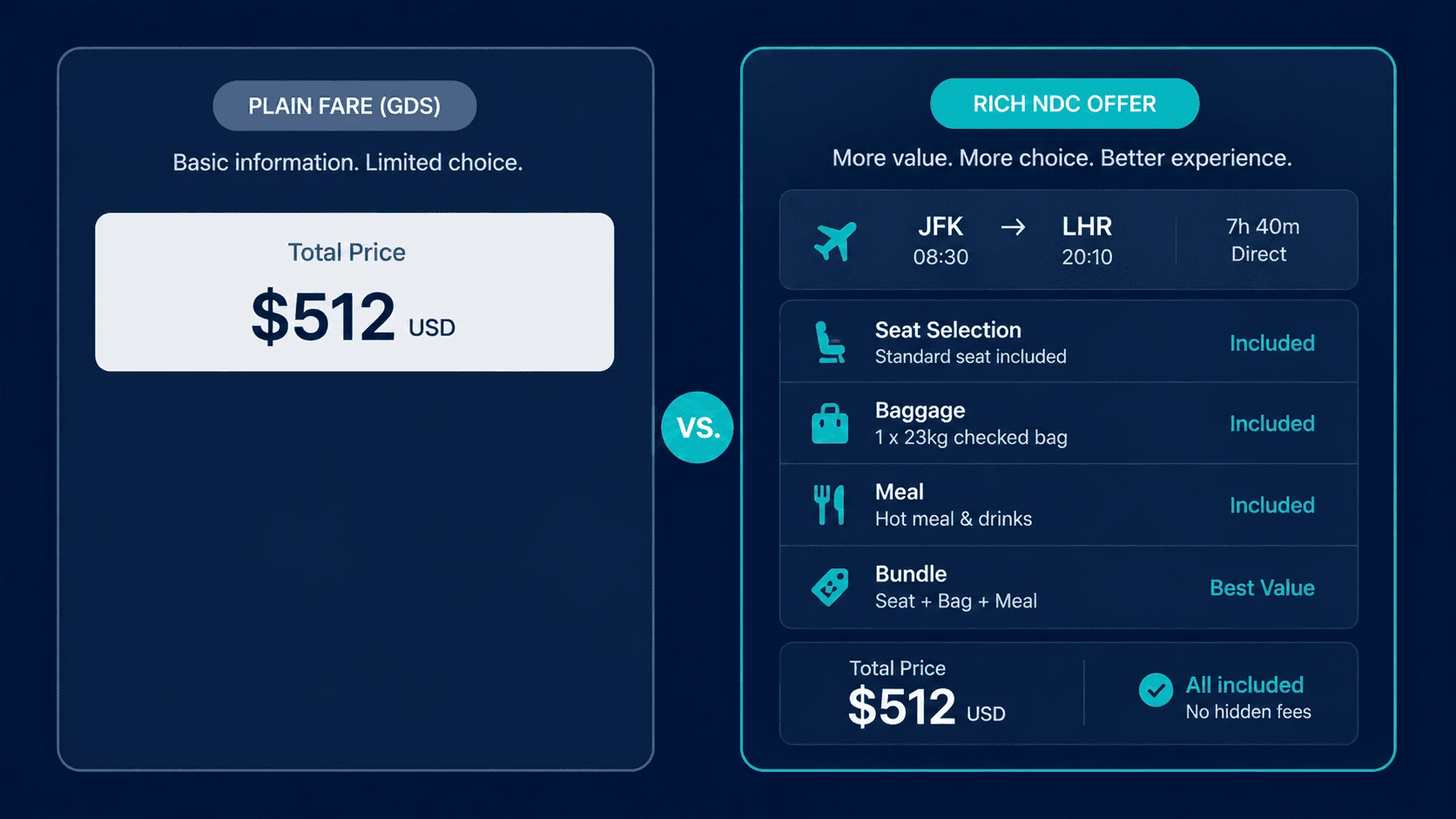
NDC gives you richer offers; the interface decides whether customers see the value.
- Group fare families under each flight. Show light, standard and flex side by side, with what each includes — bags, changes, refunds, seat selection — in the same order every time.
- Price the traveller’s needs. If a traveller says they need a checked bag, show totals that include it for every fare.
- Make extras visible before checkout. Seat maps and bag options shown at the results stage sell better than a page added after payment.
- Show the expiry gently. If an offer will expire soon, tell the traveller and re-price automatically when they return.
- Label the source quietly. Support needs to know an offer came from NDC; customers usually do not.
A results page that showed one price per flight now needs to show three or four fares clearly. That design work is part of the integration, not an afterthought — without it, NDC’s main advantage never reaches the customer.
Servicing NDC Orders
After the sale, NDC bookings behave differently from GDS bookings:
- Changes start with a reshop (find new options) and end with an order change, priced by the airline.
- Cancellations follow the airline’s rules for that offer, returned in the conditions.
- Airline-initiated changes — schedule changes and cancellations — arrive as updates to the order; your system must notice and tell the traveller.
- Support needs a view of the order as the airline sees it, not only your own copy.
Even inside a GDS, NDC servicing can differ: Travelport, for example, services classic GDS bookings itself while NDC carriers handle ticketing and servicing of their own offers. See our airline ticketing API guide for the ticketing side.
Credentials and Security
Direct NDC means credentials per airline, each with its own rules:
- Keep every airline’s credentials in a secrets store, separated by environment.
- Rotate them when people leave and on a schedule the airline allows.
- Restrict traffic to your servers where the airline supports IP allowlisting.
- Log requests and responses for every order call, without storing card data you do not need.
Through an aggregator you manage one set of credentials instead. Tripgic’s security page, for example, describes time-bound API keys you can rotate or revoke, IP whitelisting on production endpoints and audit logs.
How to Test an NDC Integration
- Shop several airlines on your busiest routes and compare the offers with what the airline’s website shows.
- Let an offer expire and confirm your platform re-prices instead of booking a dead offer.
- Book each fare family and check the conditions and baggage stored with the order.
- Add extras and seats, then retrieve the order and check they appear.
- Change and cancel an order on each airline and compare results with the conditions.
- Simulate an airline schedule change if the sandbox allows, and confirm your notification works.
- Force a timeout on order creation and confirm you retrieve before retrying.
- Mix sources: search a route with NDC, GDS and low-cost results and check duplicates are merged.
How Long It Takes, and Who You Need
| Direct NDC | Through an aggregator | |
|---|---|---|
| Per airline | Access, build, mapping and testing for each airline | None; the aggregator already connects them |
| Schema versions | Every version your airlines use | One API format |
| Servicing | Built per airline | Through one set of calls |
| Team | Developers who know NDC schemas, plus someone managing airline access | Your normal developers |
| Timeline | A project per airline, repeated | Your own build once; Tripgic activation usually 3–5 business days |
For a seller targeting one or two airlines with high volume, direct can pay off. For anyone targeting many airlines — or needing GDS and low-cost content too — the aggregator route is usually faster and cheaper in total.
What to Measure After Launch
| Measure | What it tells you |
|---|---|
| Offers expired before payment | Whether your checkout is too slow or re-pricing is missing |
| Price changes at OfferPrice | How often prices move between shop and pay |
| Order failures by airline | Which airline integrations need attention |
| Extras per NDC order | Whether you are selling what NDC makes possible |
| Support contacts per NDC order | Whether conditions and servicing are clear |
Review them by airline. NDC problems are usually airline-specific, and the numbers point you to the right one. A sudden rise for one carrier often means it has changed something on its side.
Questions to Ask an NDC Provider
| Question | What a good answer looks like |
|---|---|
| Which airlines’ NDC content do you carry? | A named list with the route each comes through |
| Do I see the airline’s full offer, with fare families and extras? | Yes, in a consistent format |
| How do you handle offer expiry and re-pricing? | A validation step that returns the final price |
| How are orders changed and cancelled? | Documented calls returning the airline’s conditions |
| How do you pass on airline schedule changes? | A stated notification method |
| Are GDS and low-cost fares in the same search? | Yes, with duplicates merged |
| Do any airlines need my agency registered? | A list and help with the process |
Common NDC Integration Mistakes
- Treating offers like fares. Offers expire; always re-price before payment.
- Copying the GDS data model. Orders are not PNRs. Design for both if you sell both.
- Leaving airline access to the end. Registration and agreements can take longer than development.
- Mapping one airline and assuming the rest match. Each airline differs; plan mapping per airline or use an aggregator.
- Skipping servicing in the first release. Changes and cancellations are where customers judge you.
- Showing fare families poorly. If customers cannot see what each fare includes, NDC’s main advantage is lost.
When Direct NDC Makes Sense
A direct NDC connection is a good choice when:
- One or two airlines account for a large share of your sales.
- Those airlines offer better content or terms on their direct NDC channel.
- You have developers who can learn and maintain the airline’s schema.
- You can handle the airline’s access requirements, such as registration or accreditation.
Many sellers in that position still use an aggregator for every other airline, and keep the direct connection for the one that matters most.
How Tripgic Gives You NDC Without Airline-by-Airline Integration
Tripgic is a B2B travel API aggregator. For NDC, here is what its own pages state:
- NDC blended with everything else. Its NDC API page describes airline-direct content — branded fares, dynamic pricing and ancillaries — blended with GDS and low-cost fares in one normalized JSON response.
- One integration. Amadeus, Sabre and Travelport, NDC and 100+ low-cost carriers — 800+ airline and LCC connections — through one REST API, with duplicate flights across GDS sources returned once at the best available price.
- Fare families and extras as API calls. Branded fares, baggage, seat and meal options, booking, ticketing and cancellation among fifteen flight endpoints in the API docs.
- Airline guides. Plain-English guides to 22 airline NDC programmes, with access rules, schema versions and GDS charges.
- Final prices, flat fee. Prices at validation and booking are final: the supplier net fare plus a flat Tripgic fee per passenger, never a percentage; figures on the pricing page.
- Test first. A free sandbox after a short call; activation for live use usually takes 3–5 business days.
Final Thoughts
NDC API integration is less about one new API than about a new way airlines sell: offers that expire, orders instead of PNRs, and airline-specific data behind a standard flow. Direct integration gives control over a few key airlines; an aggregator gives many airlines — plus GDS and low-cost fares — through one connection.
Whichever route you take, design your data for offers and orders, build servicing into the first release, and test every airline you sell before customers do. Then measure by airline, because that is where NDC problems — and NDC wins — show up first.
Want NDC, GDS and low-cost fares through one API? Book a demo and get Tripgic sandbox credentials after a short call.