 Mohammad Fahim
A visa API for travel agencies is a connection that lets an agency or OTA sell visas inside its own booking flow: the system searches the visa products for a destination, validates the traveller’s choice and creates the application order, next to the flight and hotel. Some visa APIs only return entry-requirement data; others place real application orders. The government still decides every application. Tripgic’s Visa API is the order kind, on the same credentials as Tripgic’s flight and hotel APIs.
This guide is for travel agencies, OTAs and travel-tech teams that want to add visas to their checkout. It explains the entry permits you can and cannot sell, where the visa step belongs in the booking flow, who carries the risk when a traveller is refused, how to handle passport data, and what to ask a provider. “API” here means a software interface. This guide is not about Visa Inc.’s card APIs or Advance Passenger Information.
What Is a Visa API?
A visa API is a set of endpoints that a travel seller calls from its own system to work with visas. Instead of sending travellers to an embassy page or a separate visa website, the seller shows the visa as a product in its own checkout, takes the traveller’s details once, and passes the application on through the API.
The phrase covers two quite different products, and buyers often mix them up:
| Kind of visa API | What it answers | What it returns |
|---|---|---|
| Requirement data | “Does this traveller need a visa or travel authorisation for this trip?” | Rules for a nationality, destination and transit, often with document and passport-validity rules |
| Visa orders | “Sell me that visa and submit the application” | Visa products with their conditions, a validation step, an application order, and document upload |
Requirement data is reference information. Airlines and agents have long used IATA’s Timatic for it; IATA describes Timatic as “a leading provider of real-time information on travel document requirements for international air travel”, trusted by “airlines, ground handlers, travel agents, security agents, and government officials”. The rules change constantly. IATA says it makes “on average around 70 updates per day in Timatic”, which is why no travel seller should hard-code them.
Sellers also call it an e-visa API or a travel visa API, depending on whether they mean e-visas only or every entry permit. The split above matters more than the name.
Visa orders are transactional, like a hotel or flight booking. This is what most agencies mean when they say “visa API”: a product they can show, price, sell and fulfil. A complete setup often uses both: requirement data to decide whether to show a visa offer, and an order API to sell it.
A visa order API usually follows the same rhythm as a travel agent API for flights and hotels: search, check, book, then manage the booking. The difference is what gets “booked”. A hotel booking reserves a room. A visa order starts an application that a government will review, so the seller controls the request, not the result.
What Is the Difference Between a Visa, an e-Visa, an ETA and a Visa on Arrival?
Before you sell anything, be clear about which entry permit you are selling. UN Tourism, in its Tourism Visa Openness Report 2023, sorts every entry requirement into four groups:
- Traditional visa: “all traditional paper visas affixed in the passport and all other types of non-electronic visas that must be obtained before departure”.
- eVisa: “all types of electronic entry and travel authorization that the traveller must obtain prior to departure”.
- Visa on arrival: “all visas acquired upon arrival at the destination without any prior preparation for the journey”.
- No visa: “no entry permit is required when entering the destination”.
Note that UN Tourism puts electronic travel authorisations (ETAs) inside its eVisa group. Governments draw a sharper line. The UK Home Office says: “An ETA is a digital permission to travel – it is not a visa or a tax.” The EU’s External Action Service says of ETIAS, its own scheme for visa-exempt visitors: “ETIAS is not a visa.” An ETA is for travellers who do not need a visa, and it is linked to the passport. Canada’s border agency says its eTA “is electronically linked to a traveller’s passport”.
| Permit | What it is | When | Can you sell it ahead? |
|---|---|---|---|
| Traditional visa | A paper or sticker visa in the passport, from an embassy or consulate | Before departure, often in person | Usually as an assisted service, not a fast online order |
| e-Visa | A visa applied for and issued online, such as Türkiye’s e-Visa system | Before departure | Yes, where a provider supports that destination |
| ETA | A digital permission to travel for visa-exempt nationalities: UK ETA, U.S. ESTA, Canada eTA, Australia ETA, and EU ETIAS once it starts | Before departure | Often, where the scheme allows third parties |
| Visa on arrival | A visa issued at the border; rules vary by destination and nationality | On arrival | No order to place; show the rule and conditions |
| No visa | No entry permit needed | Not needed | Nothing to sell; still check passport rules |
The UK ETA shows the scale of these schemes. GOV.UK says an ETA “lets you travel to the UK, Jersey, Guernsey or the Isle of Man for up to 6 months”, and that “you usually need an ETA rather than a visa if you’re from Europe, the USA, Australia, Canada or certain other countries”. That is a large group of leisure and business travellers who now need something before they fly, even though they do not need a visa.
Visa on arrival is not a free pass either. UN Tourism notes that these schemes “still impose certain entry conditions determined by the destination country, including requirements for evidence of accommodation, proof of sufficient financial means, and possession of a return or onward ticket”. A good booking flow shows those conditions even when there is nothing to buy. Schemes change often, so check the official source for each destination before you sell it.
How common is each type?
UN Tourism’s figures for 2023, published in March 2024, show how the mix has moved:
| Entry requirement | Share of world population (2023) | Earlier |
|---|---|---|
| Traditional visa | 47% | 77% in 2008, 59% in 2018 |
| eVisa (includes ETAs) | 18% | 3% in 2013, 7% in 2018 |
| Visa on arrival | 14% | 6% in 2008, 15% in 2018 |
| No visa | 21% | 17% in 2008, 20% in 2018 |
Two things matter for a travel seller. First, in 2023 nearly half of the world’s population still needed a traditional visa on UN Tourism’s measure, so visa questions come up constantly. Second, the electronic share has grown six-fold in ten years. UN Tourism calls eVisas “a necessary interim solution, particularly for citizens with less widely accepted travel documents”. Electronic permits are the part of the visa market that fits an API, because there is an online application to submit.
Why Should a Travel Agency Sell Visas in the Booking Flow?
Because the booking is the moment the traveller has the trip in mind, and the moment the rules can still change the plan. There are four reasons, and only one of them is revenue.
ICAO points to the booking. ICAO’s Annex 9 on facilitation, the standard that states follow for border formalities, includes a recommended practice that each state requiring an electronic travel system “should adopt policies that ensure that passengers are informed of the ETS requirements at the time of booking”. In other words, the rule-makers themselves point to the booking as the right place for information about electronic travel authorisations.
The airline pays when it goes wrong. Annex 9 requires airlines to “take necessary precautions at the point of embarkation to ensure that persons are in possession of the documents prescribed by the States of transit and destination”. A passenger who travels “without a visa, if required” is, in ICAO’s term, improperly documented, and the airline is responsible for the cost of custody and care once that passenger is refused. An IATA study based on data from 49 carriers estimates that airlines “incurred an average annual cost of approximately USD 1.1 million per carrier in 2024 to manage and remove inadmissible passengers”, for every cause of refusal, not only visas. When a seller helps the traveller arrive with the right permit, fewer trips end at the gate.
The rules move. In the same IATA study, 11 of the 49 airlines named “sudden regulatory changes as a primary uncontrollable cause of inadmissibility”. A traveller who booked months ago may not know that their destination added a travel authorisation since. A visa step in the booking flow, and a reminder in manage-booking, closes that gap.
It adds value per booking. A visa is an ancillary (an extra product sold with the main booking) in the same family as travel insurance, an eSIM or airport services: a small product attached to a trip the traveller is already paying for. It also keeps the traveller on your site instead of sending them to search for a visa service, where they may meet a competitor or a fake government page.
How Does a Visa Sale Work, Step by Step?
A visa sale inside a booking flow has six stages. The first four happen before payment; the last two happen after it.
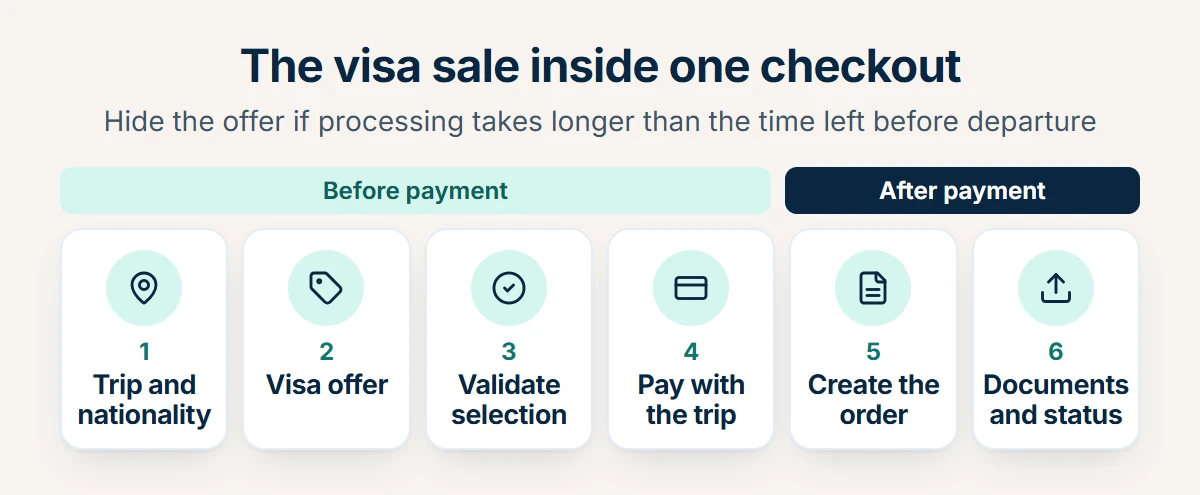
- Know the trip. You need the destination, any transit countries, the travel dates and each traveller’s nationality. Nationality matters most: two people on the same booking can need different permits, or none. Ask for it with passenger details, not at the end.
- Offer the right product. Search the visa products available for that destination and nationality, and show only what applies. If a traveller needs nothing, say so; that answer has value too. If a visa on arrival applies, show the conditions instead of an offer.
- Validate the selection. Before the traveller pays, confirm that the chosen product is still available and its conditions are current. A validation step returns the confirmed details, so the price and terms the traveller sees are the ones you will order.
- Take payment with the trip. Show the visa as its own line, with your service fee clearly separate if you charge one. Never pre-tick it. An opt-in visa line that the traveller understands creates fewer disputes later.
- Create the order. After payment, create the application order with the traveller’s details. Store the order reference with the booking, the same way you store a flight booking reference.
- Collect documents and follow up. Many applications need a passport scan or photo. Request them after the order, update the applicant’s details if they change, and keep the traveller informed until the decision.
Four operational rules separate a working visa step from a frustrating one:
- The lead-time rule. Every visa product has a processing time. If it is longer than the time left before departure, hide the offer or warn clearly. Selling a visa that cannot arrive in time is worse than not selling it.
- Mixed nationalities. Evaluate each traveller separately. A family with two passports, or a group from several countries, may need two different products on one booking.
- Transit legs. Some airports require a transit visa or authorisation even when the traveller does not leave the airport. Check the transit countries as well as the final destination.
- Later reminders. Many travellers book first and think about entry rules later. Repeat the offer on the confirmation page, in the booking email and in manage-booking, with the same lead-time rule.
What does this look like for one booking?
Take a family of three booking flights and a hotel in London. Two of them hold U.S. passports. GOV.UK says that “you usually need an ETA rather than a visa if you’re from Europe, the USA, Australia, Canada or certain other countries”, so the checkout offers an ETA product to each of those two travellers, one line per person. The third traveller holds a passport from a country that needs a UK visa. If your provider has no product for that visa, the checkout shows a clear message instead of an offer and points to the official route. The departure is five weeks away and the provider’s stated processing time fits, so the offer stays visible. The family pays once for flights, hotel and two ETAs. After payment the system creates the two orders, asks each traveller to upload a passport photo, and sends a reminder a week later to anyone who has not.
What happens after the order?
The sale is only half the job. Support teams spend most of their time on what follows, so plan the traveller’s view of it in advance:
| Stage | What the traveller should see |
|---|---|
| Order received | Confirmation that the application is being prepared, with the order reference |
| Documents needed | A clear list of what is missing and a secure upload link |
| Submitted | That the application is now with the government, and the stated processing time as an estimate |
| Decided | The result, and what to do next: travel documents to carry, or the options after a refusal |
Write your refusal policy before launch. Say which part of the price is the government’s fee, which part is your service fee, and what is refunded if the application is refused. A policy the traveller saw before paying turns a refusal into a disappointment, not a dispute.
This flow looks like adding any product to an OTA. If you are deciding which products to add first, our guide to the travel API for OTAs walks through the order most sellers follow.
Which Integration Model Fits Your Business?
There are three common ways to put visas in front of your customers. They differ in who holds the traveller’s data and how much of the experience you own.
| Referral link | Widget or white-label page | Full API | |
|---|---|---|---|
| How it works | You send the traveller to a visa provider’s site, often with a tracking link | The provider’s form runs inside your site or under your brand | Your system calls the provider’s API and builds its own screens |
| Who holds passport data | The provider | Mostly the provider | You and the provider |
| Build effort | Lowest | Low to medium | Highest |
| Brand and checkout | The traveller leaves your site | Your brand, the provider’s flow | Your brand and your checkout, one payment |
| Bundling with the trip | Not possible | Limited | Full: visa, flight and hotel in one basket |
| Best for | Testing demand | Small agencies without developers | OTAs and platforms with their own checkout |
A referral link is a reasonable first test, but it gives away the customer at the moment of purchase. A widget keeps your brand but rarely lets you sell the visa in the same basket as the flight. A full API is the only model where the visa becomes part of the trip: one search, one checkout, one booking record. It also makes you responsible for the traveller’s data, which the section on passport data below covers.
The choice often follows the rest of your stack. If you already connect to a travel API for flights and hotels, adding visas through the same provider means the same authentication, the same response format and the same error handling, rather than a second integration to build and support. That is the case for a unified travel API in general, and visas are a clear example of it.
Who Approves the Visa, and Who Is Responsible?
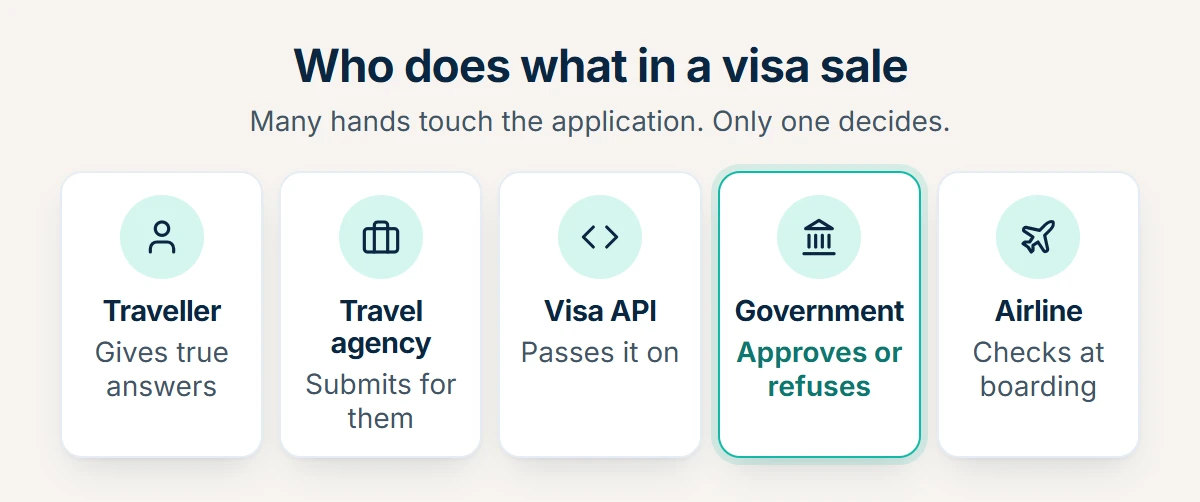
Five parties touch a visa sold through a booking flow, and only one of them decides.
| Party | Role | What it cannot do |
|---|---|---|
| Traveller | Gives true answers and documents; stays responsible for them | Pass the responsibility to the seller |
| Travel agency or OTA | Sells the service, collects the data, submits on the traveller’s behalf | Approve, speed up or guarantee anything |
| Visa API provider | Passes the order and documents on, returns the order details | Decide the application |
| Government | Approves or refuses, and decides again at the border | Is not bound by anyone’s promise |
| Airline | Checks documents at boarding and pays when a passenger is refused | Fly a passenger who lacks a required permit |
The U.S. rules show this clearly. The Department of Homeland Security says it “designed ESTA to allow a third party, such as a relative, friend, or travel agent, to submit an application on behalf of the traveler”, but adds that “in all cases, the traveler is responsible for the answers submitted on the traveler’s behalf by a third party”. CBP then “will approve or deny the application”, and even an approval “does not guarantee that the traveler is admissible”. On its ESTA page CBP repeats: “An approved ESTA does not guarantee admission to the United States.”
Other schemes take a similar view. Australia’s Department of Home Affairs says ETA applications “can be made by individual applicants or by travel industry representatives (travel agents and airlines) on behalf of applicants”, with the agent entering an IATA numeric code or a travel agent ID verification number and declaring that they are not the applicant. The EU says that “it will be legal for the commercial intermediaries to apply on your behalf” for ETIAS, and warns that they “may also charge an additional fee for their services”.
What should a travel seller never imply?
Governments are wary of third-party visa sites, and they say so. ICAO asks states to make clear that their own platform “is the preferred means for applying online in order to reduce the scope of unofficial third-party vendors that may charge an additional fee”. GOV.UK tells travellers: “Avoid websites that imitate government services.” Canada’s IRCC says that some third-party companies “do not operate on behalf of the Government of Canada, but have websites that charge extra fees”.
None of this makes a travel seller’s visa service wrong. It means the service must be honest about what it is. Four wording rules keep you on the right side:
- Say you prepare and submit the application for the traveller, not that you get them approved.
- Show your service fee separately from any government fee.
- Never use government crests, flags or names in a way that suggests you are the official site.
- Never promise a processing time you do not control. Quote the provider’s stated time as an estimate.
How Should You Handle Passport Data?
A visa order carries some of the most sensitive data a travel seller ever holds. The DHS privacy assessment for ESTA lists what that one form collects: “name, country of birth and citizenship, date of birth, sex, travel document information, contact information”, “parents’ names” and “employment information”, plus “a photograph of the applicant’s passport page” and a selfie.
If you sell to travellers in the EU or the UK, the EU GDPR or the UK GDPR will usually apply, and four of its rules map directly onto a visa step:
- Collect only what the application needs. Article 5 requires data to be “adequate, relevant and limited to what is necessary”. Do not keep passport scans after the order is complete unless you have a reason to.
- Secure it. Article 32 lists “the pseudonymisation and encryption of personal data” among the expected measures. Encrypt documents at rest and in transit.
- Sign a processor contract (the agreement that says how another company may use the data you give it). When you pass data to a visa provider, Article 28 says the processing “shall be governed by a contract or other legal act”. Every company in the chain needs one.
- Know what a photo is. Recital 51 says photographs “should not systematically be considered” special-category data; they count as biometric only when processed by specific technical means to identify a person. Treat them as sensitive anyway.
Two technical rules matter as much as the legal ones. Make every visa API call from your server, never from the traveller’s browser or a mobile app, so your credentials and the traveller’s data never pass through public code. And never ask travellers to email passport scans. Collect them through a secure upload that goes straight to the order. Passport data is personal data under GDPR; card security standards such as PCI DSS cover payment cards, not passports, so they do not settle this question for you. Our guide to travel API security covers credentials and server-side calls in more detail.
What Should You Ask a Visa API Provider?
Visa products vary more than flights or hotels, because every destination has its own rules and every provider covers a different set. Ask these questions before you sign, and expect specific answers.
| Question | What a good answer looks like |
|---|---|
| Which destinations and traveller nationalities do you cover? | A list you can filter by nationality and destination, not a headline country count |
| Which permit types: e-visa, ETA, traditional visa support? | Each product labelled by type, with its official scheme named |
| Do you place real applications, or only return requirement data? | A clear answer, with the order and document steps documented |
| How do I learn processing times? | A stated estimate per product that you can use for the lead-time rule |
| Who collects payment, and how are fees shown? | A clear split between government fees and service fees, and who is the merchant of record (the company that takes the payment and is named on the receipt) |
| What happens when an application is refused? | A written policy on refunds and service fees |
| How do I upload documents and update applicant details? | Endpoints for both, after the order is created |
| How do I learn the result of an application? | A documented way to get status, whether by a call you make or by a notification |
| Is there a sandbox? | Test credentials and the same schema as production |
| How do you handle personal data? | A processor agreement, encryption, a retention period, and server-side calls only |
| Who supports urgent departures? | A named support channel with a stated response time |
The checklist is the same one you would use for any supplier. Our guide on how to choose a travel API provider has the wider version for flights, hotels and the rest.
What Mistakes Should You Avoid When Adding Visas to Checkout?
Most visa problems in a booking flow come from a small set of mistakes. Each one is easy to avoid once you know it, and most are covered in more detail above.
| Mistake | Why it hurts | What to do instead |
|---|---|---|
| Promising approval | “Guaranteed approval” claims something no seller controls, and it is the fastest way to a complaint | Say you prepare and submit the application |
| Offering it too late | An offer that first appears in a post-booking email reaches travellers who have already looked elsewhere | Offer it in the checkout, then repeat it |
| One answer per booking | Nationality is per traveller, so a single rule is wrong for mixed groups | Check each traveller separately |
| Ignoring transit | Some connections need a transit permit even airside | Check transit countries as well as the destination |
| Pre-ticked boxes | An opt-out visa line looks like a hidden charge and creates refund requests | Make the visa an opt-in line with its own price |
| Looking official | Flags, crests and “official portal” wording draw the warnings governments publish | Present your service as a service, with your own brand |
| Hard-coded rules | Entry rules change all the time | Pull current products and conditions from your provider at the moment of sale |
How Does Tripgic’s Visa API Work?
Tripgic is a travel API aggregator, a technical intermediary rather than a travel operator. Its Visa API is built to “offer visas at checkout — search visa packages, validate the selection and create the application order through one normalized API”. What it adds for a travel seller is that it is part of the same integration as the other Tripgic products the seller already books.
- The same integration as flights and hotels. In the words of the visa page: “One integration, one JSON envelope — the same credentials you use for flights and hotels.” The same authentication and the same JSON envelope as the Flight API and the Hotel API, so your existing integration patterns carry over.
- Sold with the trip. Because the Visa API is part of the same integration, “a visa can be offered in the same checkout as the rest of the trip”.
- A documented booking flow. The API documentation lists the visa calls in order: search visa packages (
/service-visa/search), get visa details by code (/service-visa/details), validate the selection (/service-visa/validation), read the validated details by tracking ID (/service-visa/validation-details) and create the visa application order (/service-visa/order). - Work after the order. The documentation adds calls to update applicant details, upload an applicant document and cancel applicants, plus reference lookups for visa countries, categories and document types.
- A tracking ID that links each step. A search returns a
tracking_idthat you send back on the calls that follow. If the validation session expires, the error reference says to “validate again and use the new tracking_id”, never an old one. - Clear failure handling. API responses, failures included, come back with HTTP 200, so you check the
statusfield in the response body. The go-live checklist adds two rules that matter for visa orders: never retry a booking call without first checking the booking’s status, because a blind retry can create a duplicate, and call the API only from your backend. - On request, on any plan. The pricing page lists the Visa API as “added to any plan on request”. Book a kick-off call and the team adds it to your plan.
- A free sandbox. You can “get sandbox credentials at no charge, and build against the same schema you’ll use in production”. The contact page lists technical support at support@tripgic.com.
The visa sits alongside flights, hotels, eSIM, transfers, activities and more in documentation that covers 134 endpoints, all returning the same JSON envelope. For a travel agency that already sells flights and hotels through Tripgic, adding visas follows the same search, validate and order pattern the team already uses, once the Visa API is added to the plan. A white-label site or a regional OTA can add them later, like the startup example in our white-label travel API guide.
Before you plan a launch, ask the Tripgic team which destinations, nationalities and visa categories fit your markets, and how your system learns the progress of each visa order. The kick-off call is the place to go through both, and the sandbox is where your team tests the flow end to end.
Key Terms
| Term | Meaning |
|---|---|
| Visa API | Endpoints that let a travel seller search, validate and order visas from its own system |
| Ancillary | An extra product sold with the main booking, such as a visa, insurance or an eSIM |
| Merchant of record | The company that takes the payment and is named on the receipt |
| Processor contract | The GDPR agreement that sets how another company may use personal data you pass to it |
| e-Visa | A visa applied for and issued online before travel |
| ETA | Electronic travel authorisation: a digital permission to travel for visa-exempt nationals, linked to the passport |
| ESTA | The U.S. Electronic System for Travel Authorization, used by Visa Waiver Program travellers |
| ETIAS | The EU’s planned travel authorisation scheme for visa-exempt visitors; the EU will announce its start date |
| Visa on arrival | A visa issued at the destination border, usually with entry conditions |
| Timatic | IATA’s database of travel document requirements, used by airlines and agents |
| Inadmissible passenger | A traveller refused entry by the destination’s authorities |
| Advance Passenger Information | Passport data airlines send to border authorities before a flight; also abbreviated API |
| Tracking ID | The reference a search returns, carried into the calls that follow it |