 Golam Shahrier

A PNR (passenger name record) is the booking record an airline or GDS reservation system creates when a flight is reserved. It holds the passengers’ names, the flights (called segments), contact details and ticketing information. The six-character code most people call “the PNR” is the record locator, the key that finds the record. Travel businesses meet a PNR on every GDS booking, including bookings made through the Tripgic Flight API.
This guide is for travel agencies, OTAs and travel-tech teams that sell flights and have to store, find and service bookings. It explains what a PNR contains, how it differs from a record locator, a ticket number and an NDC order, why one trip can have several of them, and what your own system should keep for every booking. It covers the airline PNR only. The PNR number printed on a train ticket in some countries belongs to a separate rail system.
What Does PNR Stand For?
PNR stands for passenger name record. In travel, PNR means the booking record held in an airline’s or a GDS’s reservation system: who is travelling, on which flights, how to reach them and how the booking will be ticketed.
The word is used for two different things, and it helps to separate them early:
- The record. The full file: passengers, flights, contacts, ticketing details, requests and remarks.
- The code. The short code that retrieves the file. Its proper name is the record locator. Most travellers use “PNR” for this code. Even the Amadeus travel glossary calls the PNR “a 6-character code” in one sentence.
Outside air travel the same three letters mean other things. Rail operators in some countries print a PNR number on train tickets, for example. That is a separate booking system with its own format, and this guide does not cover it.
What Is a PNR in Travel?
The quick answer, in four terms:
| Term | In one line |
|---|---|
| PNR | The booking record in an airline or GDS reservation system |
| Record locator | The code, typically six characters, that opens that record |
| Ticket number | The number of the e-ticket, usually 13 digits, issued per passenger |
| NDC order | The airline-side record that replaces the PNR, found by its Order ID |
A PNR is a record in the database of a computer reservation system (CRS). A CRS is the booking system that an airline or a GDS runs. The record holds the itinerary of one passenger, or of a group travelling together. The Amadeus travel glossary is strict about where it lives: “all PNRs must be created on a Computer Reservation System (CRS).” An airline that sells direct creates the record in its own system. A travel agency creates it through a GDS, which Amadeus describes as the way agencies and websites “access and make bookings on an airline’s CRS.”
PNRs began as a practical fix. One passenger often flew on several carriers, and those airlines needed to exchange reservation information. So they agreed on how to pass a booking between systems. They did not agree on how to store it. As Wikipedia’s entry notes, “there is no general industry standard for the layout and content of a PNR.” AltexSoft reports that a PNR created in Amadeus can reach as many as 999 data elements, yet only five are mandatory.
Three things a PNR is not:
- It is not a ticket. A PNR can exist for days with no ticket issued against it.
- It is not proof of payment. The airline treats the booking as paid only after ticketing.
- It is not a permanent ID. Locators are reused over time, as a later section shows.
What Are the 5 Elements of a PNR?
A reservation system will not save a PNR until five elements are present. Amadeus lists them as name, itinerary, contact, ticketing and reference. According to AltexSoft, Sabre teaches the same set with the memory word PRINT: phone, received from, itinerary, name, ticketing.
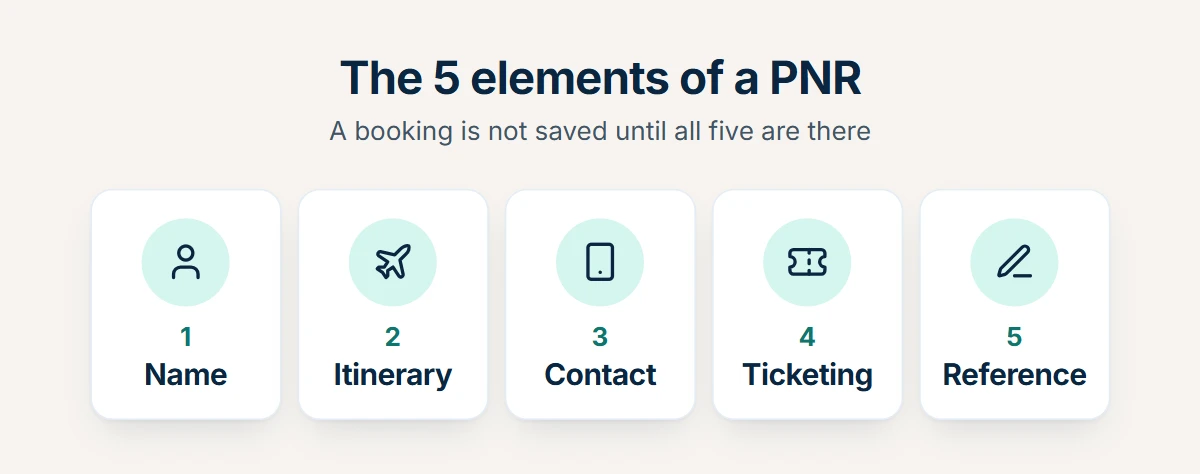
| Element (Amadeus’s name) | What it holds | PRINT letter (Sabre) |
|---|---|---|
| Name | The passenger’s first name, surname and title | N: name |
| Itinerary | At least one segment of the trip | I: itinerary |
| Contact | The passenger’s phone and email, or the agent’s contact details | P: phone |
| Ticketing | A ticket number, or a ticketing time limit if the ticket is not issued yet | T: ticketing |
| Reference | Who is responsible for the booking: the person or organisation that created it | R: received from |
The fifth element records who is behind the booking. Amadeus says it holds details of “the individual or organization responsible for creating the PNR and handling any subsequent modifications after the booking has been made.” AltexSoft describes the Sabre field as the last person who changed the record. Either way, every PNR carries a note of who gave the instruction, so a later dispute can be traced.
For a business that builds its own booking flow, the first element causes the most trouble. Names go into the PNR exactly as typed, and airlines match them against the passport at the airport. Collect names in passport format at the start of checkout, not at the end.
What Else Can a PNR Hold?
A PNR can carry many optional elements beyond its five required ones. The common ones are:
- Special service requests (SSR): wheelchair assistance, special meals, bassinets and similar requests an airline must act on.
- Other service information (OSI): notes for the airline that need no action, such as a traveller being a VIP or an unaccompanied minor’s contact.
- Frequent flyer numbers, so the booking earns miles and status benefits apply.
- Form of payment, which Amadeus calls “one of the most important additional elements.”
- Remarks: free-text notes for the agency itself, such as a cost centre or an invoice reference.
- The stored fare. In Amadeus the price is kept in a separate record linked to the PNR, the transitional stored ticket (TST).
A PNR can also hold more than flights. One record may carry a hotel and a car next to the air segments.
What Does a PNR Number Look Like?
A PNR number is typically six letters and digits, such as K7RW2P. It is the record locator: the code that retrieves the PNR, not the PNR itself. Wikipedia’s record locator entry describes it as “typically 6 alphanumeric characters in length,” and adds that seven- and eight-character locators also exist.
A simplified view of the record behind that code, for illustration only:
Record locator   K7RW2P
1 Name           KHAN/SARA MS
2 Itinerary      XX 123  14 MAR  DXB-LHR  HK1
3 Contact        agency phone, passenger email
4 Ticketing      time limit 10 MAR (ticket number once issued)
5 Reference      booked by the agent on the passenger's request
Three details matter to anyone who stores these codes:
- Some characters are avoided. Because 1, I and L can be confused, as can 0 and O, these characters are not always used in record locators.
- A locator is unique only inside one system, and only for a time. Wikipedia states that “record locators are unique within a given CRS at a specific point in time” and that they “may be reused” once the old PNRs are purged.
- Records do not stay live for long. AltexSoft notes that a PNR is usually archived within one to five days after the last segment is flown.
The practical rule follows directly: never use the record locator alone as the primary key in your database. Use your own booking ID, and store the locator together with the system it came from and the date the booking was made.
Where Do You Find Your PNR Number?
Your PNR number is the six-character booking reference on your confirmation email, e-ticket receipt and boarding pass. To check or change a booking, open the airline’s “manage booking” page and enter that code with the passenger’s surname. A traveller finds the PNR number in four places:
- the booking confirmation email,
- the e-ticket receipt or itinerary, where it is usually labelled “booking reference” or “reservation code”,
- the boarding pass,
- the airline’s app or its “manage booking” page.
A travel seller should know one catch. A document produced from a GDS booking can show the GDS’s locator, which the airline’s website may not accept. Print the airline’s own locator on anything you send to a traveller.
How Long Does a PNR Stay Active, and Can It Change?
A PNR stays live from the moment it is saved until shortly after the trip. During that time it can change many times: AltexSoft notes that the record is updated whenever the reservation information is altered, for example when a seat is added, a flight is rebooked or the airline changes its schedule. The record locator normally stays the same through those changes. After the last flight the record is archived, and its locator can later be given to a new booking.
Is a PNR the Same as a Booking Reference or Record Locator?
In conversation, yes. Airlines, agencies and booking sites use several labels for the same short code: booking reference, record locator, reservation code, confirmation number. Travellers treat them as one thing. Strictly, a PNR is the whole booking record, and a record locator or booking reference is only the code that retrieves it.
| Term | What it really is | Same as the PNR code? |
|---|---|---|
| PNR | The whole booking record; loosely, its code | — |
| Record locator | The code that retrieves the PNR in one system | Yes |
| Booking reference / reservation code | The label most airlines print for the locator | Yes |
| Confirmation number / confirmation code | Another consumer label for the locator | Yes |
| Ticket number | The number of the e-ticket issued against the booking | No |
| Order ID | The identifier of an NDC order | No, though it may be built from one |
| Flight number | The airline’s number for the flight itself | No |
Two of these are confused most often. A flight number such as XX 123 identifies the flight, which hundreds of passengers share. A record locator identifies one booking. And a ticket number identifies one passenger’s paid travel document, which the next section explains.
For support teams, the useful habit is to ask “which system gave you this code?” before searching. The same six characters can mean a GDS locator, an airline locator or a reference from a booking site, and each opens a different screen.
PNR vs Ticket Number: What Is the Difference?
A PNR and a ticket number are different things. The PNR is the booking record, found with a record locator of typically six characters, and one PNR covers every passenger in the booking. The ticket is the travel document issued against that booking after payment, and tickets are issued per passenger, each with its own ticket number. A booking can have a PNR and no ticket yet. In that case the seats are held, but the airline does not treat the fare as paid.
The Amadeus glossary puts it in one sentence: “A PNR is the internal record of the booking, while a ticket is the document that confirms a traveler’s seat on the flight.”
| PNR | E-ticket | |
|---|---|---|
| What it is | The booking record | The travel document issued against the booking |
| Identifier | Record locator, typically six characters | Ticket number, usually 13 digits |
| How many | One per booking, shared by everyone in it | Issued per passenger |
| Created | When the seats are reserved | After the fare is paid |
| Can the passenger fly on it alone? | No | Yes |
The order of events is fixed. Amadeus describes it in three steps: the price is stored against the PNR, “a form of payment element is added to the PNR, and then the ticket is issued,” and finally “the ticket number is added to the PNR.” Until that last step, the seats are only held.
An e-ticket number is usually 13 digits. Travelport’s ticketing guide breaks it down: “the airline’s 3-digit ticketing code, 4-digit form number, and 6-digit serial number.” Paid extras such as bags and seats are documented separately, on an EMD (electronic miscellaneous document), the IATA standard for recording ancillary sales. An EMD can be tied to a ticket (EMD-A) or stand alone (EMD-S).
So one booking can produce a locator, several ticket numbers and several EMD numbers. Each is needed for a different job: the locator to find the booking, the ticket number to change or refund a passenger’s travel, the EMD number to refund an extra. Our airline ticketing API guide covers the ticketing step and the rules about who may issue the ticket in detail.
How Is a PNR Created, Step by Step?
In a GDS booking, a PNR moves through the same eight stages whether the booking is made in Amadeus, Sabre or Travelport.
- Search and price. The seller searches schedules and fares and chooses flights.
- Sell the segments. The chosen flights are added to a new record as segments.
- Add the five elements. Names, contact, ticketing arrangement and the reference are entered. The system refuses to save the record without them.
- End the transaction. The record is saved, and the system returns the record locator.
- The airline answers. Each segment gets a status code that shows whether the airline confirmed the seats.
- Store the fare and issue the ticket. The price is stored, payment is added and the ticket is issued before the airline’s deadline. Our flight booking system guide explains the ticketing time limit.
- Service the booking. Changes, schedule changes, refunds and reissues all happen against the same record.
- Archive. After travel the record leaves the live system.
An agent types these steps as commands on a GDS screen, which our guide to GDS for travel agents describes. A developer sends them as API calls. The record that results is the same, whether it came from the Amadeus API, the Sabre API or the Travelport API.
What Do PNR Status Codes Mean?
Every air segment in a PNR carries a two-letter status code. Travelport’s developer documentation defines the common ones:
| Code | Travelport’s meaning | Our guidance for a seller |
|---|---|---|
| HK | Holds confirmed | Ticket before the time limit |
| HL | Holds waitlist | Wait; do not ticket |
| KK | Carrier confirmed | Accept it, so the segment becomes HK |
| TK | Schedule change. Advise passenger of new scheduled times | Tell the traveller and accept or rebook |
| UC | Unable to confirm or waitlist | Remove the segment and offer another flight |
| UN | Unable - no flight | Rebook the passenger |
The meanings in the middle column are Travelport’s; the last column is our own guidance. The codes matter because a ticket should be issued only on a confirmed segment. If your platform consumes a flight API, check how it reports segment status and make “confirmed” a condition of the ticketing call.
Why Can One Trip Have More Than One PNR?
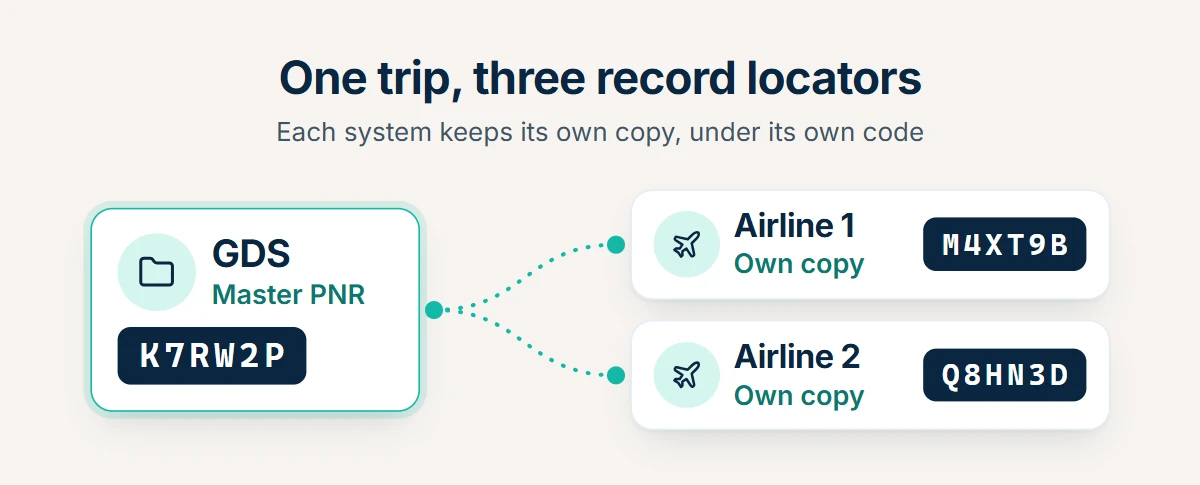
One trip can have more than one PNR because every reservation system that takes part in the booking keeps its own copy, under its own record locator.
Wikipedia’s PNR entry describes how it works. The system where the booking is made holds the master PNR. When other airlines carry part of the trip, “copies of the PNR information are sent to the CRSs of the airlines that will be providing transportation.” Each copy gets its own record locator. Those locators are then reported back to the master record, so the files stay linked.
The diagram shows a trip on two airlines booked in a GDS: one master PNR and two airline copies, each under a different code.
In practice that produces four common cases:
- A GDS booking on one airline. The GDS holds the master PNR; the airline’s system usually holds a copy under a different locator. When the airline is hosted in that same GDS, the two can share one record and one locator. Otherwise the traveller usually needs the airline’s locator to manage the booking on the airline’s website.
- A trip on two airlines. Each airline keeps its own copy, so one itinerary can carry three locators.
- A split booking. When one traveller in a shared booking changes plans, that passenger is divided into a new record, and the original record keeps the others. Travelport’s documentation says the new “child” booking is “given its own record locator.”
- A booking made outside the GDS. AltexSoft describes how corporate travel agencies add a “passive segment” to mirror such a booking in the GDS, so the agency can still see the trip and its reporting and travel-policy tools still work.
Low-cost carriers add a fifth case. They sell mainly through their own direct channels. A booking made that way never touches a GDS: it exists only in the airline’s own system, under the airline’s own reference. Our low-cost carrier API guide explains how that content reaches a booking platform.
The lesson for a booking system is to treat locators as a list, not a single field. Store every locator you receive, with the system or airline that issued it.
PNR vs NDC Order: What Replaces the PNR?
An NDC order replaces the PNR for bookings made through an airline’s NDC connection. In NDC, IATA’s standard for airline-direct selling, the airline builds the offer itself, and an accepted offer becomes an order held in the airline’s own system. The order does the PNR’s job and is identified by an Order ID in place of a record locator. A PNR is found with a record locator of typically six characters. An NDC order is found with an Order ID, which is longer and names the airline that owns the order.
| PNR, e-ticket and EMD | NDC order | ONE Order | |
|---|---|---|---|
| Where the record lives | GDS or airline reservation system | The airline’s order system | The airline’s order system |
| Identifier | Record locator, typically six characters | Order ID | A single order reference |
| Travel documents | E-tickets and EMDs, numbered separately | Usually still issued behind the order | Folded into the order |
| Serviced through | The GDS or the airline’s reservation system | The airline’s NDC API | The order itself |
| Standard | Interline messaging rules (AIRIMP) | IATA NDC | IATA Resolution 797 |
IATA defines the Order ID format in Resolution 777: an airline designator of two or three characters, a three-character airline accounting code, and an eight-character airline reference. That is longer than a locator and, unlike a locator, it names the airline that owns the order.
The move from PNRs to orders is gradual, and IATA’s own guidance says so. For airlines that have not yet moved to a native Order ID, “the Airline may construct the Order ID using existing Booking References,” and an order can be retrieved with a booking reference. The same IATA page notes that an airline “may be mimicking a true Order Management System while still using PNR’s in the background.” Many NDC orders therefore still have a PNR and e-tickets behind them.
ONE Order is the end state. IATA describes it as “an XML-based standard that combines these multiple records into a single retail and customer focused Order,” and says it works “by gradually phasing out the current booking (PNRs) and ticketing records (e-tickets and electronic miscellaneous documents, or EMDs).” IATA’s Passenger Services Conference adopted the ONE Order resolution in October 2016, and it is published as Resolution 797.
For a travel business the consequence is simple to state and takes work to build: for years, your platform will hold PNR-based bookings and order-based bookings at the same time. Our comparison of how servicing differs between PNRs and orders and our guide to storing orders beside PNRs in your data model go deeper on both.
What a Support Team Sees in Practice
The difference between a PNR and an order shows up most after the ticket is issued. A void means cancelling a ticket shortly after it is issued; a refund comes later and follows the fare rules.
We asked Nasif Kabir Jubian, the support team lead at Reservationhub, a sister product from the same group that sells travel booking software to agencies, with void and refund management built in. He describes the two cases like this. On a GDS booking, the team can open the record in the GDS and void, cancel or refund the ticket without much trouble, and there is usually enough time to do it. An NDC booking is connected directly to the airline, so the time allowed for a void is much shorter, and there is less flexibility on voids and refunds in general.
The practical lesson for a seller: on an NDC fare, confirm the passenger names and dates before you issue the ticket, and send a void request the moment a customer asks for one. Waiting until the end of the day can be too late.
What Does a PNR or Order Look Like in a Flight API?
A developer never sees the GDS screen. The booking record arrives as fields in a JSON or XML response, and the identifiers differ by channel.
| Channel | Record created at the source | Identifiers to expect |
|---|---|---|
| GDS | A PNR in the GDS, with a copy in the airline’s system | GDS record locator, airline record locator, ticket numbers, EMD numbers |
| NDC | An order in the airline’s system | Order ID, often a booking reference as well, ticket numbers |
| Low-cost carrier, direct | A reservation in the airline’s own system | The airline’s booking reference |
| Aggregator API | Whichever of the above the fare came from | The provider’s own reference for the booking; which source identifiers it also returns differs by provider, so check its documentation |
A typical flight booking flow maps onto the record like this:
- Search returns offers. Nothing exists at the airline yet.
- Validate or price confirms the fare is still available. Still no record.
- Create booking is the moment the PNR or order is created at the source and seats are held.
- Issue ticket turns the held booking into paid travel documents.
- Retrieve booking reads the current state of the record, including any schedule change.
- Change, cancel or refund act on the record and on the documents issued against it.
The same identifiers come back as fields in the booking response. This is a generic field map, not any one provider’s response format:
| Identifier | Who issues it | What you use it for |
|---|---|---|
| Provider booking ID | Your API provider | Retrieving and servicing the booking through the provider |
| GDS record locator | The GDS | Support requests to the supplier on a GDS booking |
| Airline record locator | The airline | The traveller’s “manage booking” and check-in |
| Order ID | The airline, for an NDC booking | Changes and cancellations on the airline’s order |
| Ticket number | Issued per passenger at ticketing | Changes, refunds and problems at the airport |
| EMD number | Issued for a paid extra | Refunding a bag, a seat or a fee |
Two failure points deserve design time. The first is the gap between steps 3 and 4: a created booking with no ticket expires at the time limit. The second is retries. If a create-booking call times out, the record may still have been created at the airline. Check the booking’s status before sending the call again, or you may hold the same seats twice. Our flight booking API guide walks through the whole flow call by call.
What Should a Travel Business Store for Every Booking?
Store more identifiers than you think you need. Each one answers a different question from a traveller, an airline or an accountant.
| Field | Why you need it |
|---|---|
| Your own booking ID | A key that never changes and is never reused |
| Channel and source | Whether the booking is GDS, NDC or direct, and from which system |
| Provider booking ID | To retrieve and service the booking through your API provider |
| Every record locator, with its issuer | The traveller needs the airline’s; your supplier may need the GDS’s |
| Order ID, for NDC bookings | The key for airline order servicing |
| Ticket number per passenger | For changes, refunds and airport problems |
| EMD numbers | Paid extras are refunded separately |
| Ticketing time limit | To ticket or cancel in time |
| Segment status | To stop ticketing on an unconfirmed seat |
| Passenger names as sent | To prove what was booked if a name is disputed |
| Timestamps of every state change | Created, ticketed, changed, voided, refunded |
Three habits make the table useful. Keep the booking’s state as its own field, so nobody has to guess whether a booking is held or ticketed. Record which system each code belongs to. And keep the raw response from every booking and ticketing call, because it settles arguments months later.
Common PNR Mistakes to Avoid
Four mistakes cause most of the booking problems described in this guide:
- Using the record locator as your database key. Locators are reused over time, and one trip can have several. Key on your own booking ID.
- Sending the traveller the wrong locator. The airline’s website usually wants the airline’s own locator, which can differ from the GDS one.
- Ticketing a segment that is not confirmed. A segment with status UC or UN has no seat behind it. Issue the ticket only when the status says confirmed.
- Retrying a booking call that timed out. The record may already exist at the airline. Check the booking’s status first, or you may hold the same seats twice.
An agency that sells through a consolidator or a host agency should also note whose identity the ticket was issued under. Our guides to the flight consolidator model and the travel agent API explain those arrangements.
Who Can See PNR Data, and What Are the Rules?
A PNR is personal data. ICAO, the UN aviation agency, says that PNRs “are collected by airlines solely for their business purposes” and that they “can contain sensitive personal data.” Governments also want that data for border and security checks, and the rules differ by region.
| Region | Rule | What it requires |
|---|---|---|
| United States | 19 CFR 122.49d | Carriers on flights to or from the US must give Customs electronic access to PNR data on request, limited to data the carrier actually holds |
| European Union | Directive (EU) 2016/681 of 27 April 2016 | Airlines send PNR data for flights between third countries and EU countries; member states may also apply it to flights inside the EU under certain conditions |
| Worldwide | PNRGOV | The standard message for sending PNR data to governments, which ICAO says is complementary to its PNR guidelines in Doc 9944 |
The EU rules also limit how long authorities keep the data: according to the European Commission, it “must be depersonalised” after six months and deleted after five years. On 21 June 2022 the Court of Justice of the EU confirmed the directive’s validity in Case C-817/19, on condition that its provisions are interpreted strictly.
These duties fall mainly on airlines. A travel seller still handles the same personal data on the way in, so three precautions apply to any booking platform:
- Collect only what the booking needs, and collect it accurately. Passport details entered wrongly cause problems at the border.
- Limit who can open a booking inside your company, and log who did.
- Treat the locator as a credential. Can someone look up a booking with only a PNR? On many airline websites, yes: a record locator and a surname are enough to open a booking and change it. Do not share the two together, and do not print them where strangers can read them.
This section describes the public rules. It is not legal advice, and a business that stores traveller data should confirm its own obligations.
How Tripgic Handles Flight Booking Records
Tripgic is a travel API aggregator: a technical intermediary, not a direct travel operator. Bookings are fulfilled by the underlying airlines, so a GDS booking is still a GDS PNR and an NDC booking is still an airline order. What Tripgic changes is how many systems your team has to learn in order to create and service it.
- One integration for every source. The Tripgic Flight API is one REST integration to search, price, book and ticket flights across Amadeus, Sabre and Travelport, airline-direct NDC offers and 100+ low-cost carriers, with 800+ airline and LCC connections in all. Every source returns the same normalized JSON.
- PNRs and orders behind the same calls. The NDC page states the difference plainly: a GDS fare, once booked, is “a GDS PNR, serviced in the GDS”, and an NDC fare is “an airline order, serviced through the airline’s NDC API”. Through Tripgic you call the same REST endpoints for NDC, GDS and low-cost content.
- Booking and ticketing over the API. You add traveller details, create the booking and issue tickets with no manual ticketing step on your side, then pull booking details at any time or cancel through the same integration.
- After-sales in the documentation. The API documentation lists flight after-sales calls for refund quotes, void and refund requests, re-issues, splitting passengers into a new booking, passport updates and GDS PNR import, plus a re-price check before ticket issuance.
- A rule against duplicate bookings. The same documentation warns never to retry a booking, issue or cancel call without first checking the booking’s status, because a blind retry can create a duplicate booking.
- No GDS contract of your own. Direct GDS access means a commercial contract, an office ID and a certification for each GDS, which typically takes 6–12 months per GDS. The GDS page describes one agreement for all three, starting with a kick-off call and a free sandbox.
- The terms, defined. The travel API glossary defines PNR, order, queue and ticketing in a sentence or two each.
Flights are one service among several. The documentation covers 134 endpoints that all return the same JSON envelope, and every service follows the same pattern, so hotels, transfers and other products reuse the integration you already built.
Key Terms
| Term | Meaning |
|---|---|
| PNR | Passenger name record: the booking record in an airline or GDS reservation system |
| Record locator | The code, typically six characters, that retrieves a PNR in one system |
| Master PNR | The PNR in the system where the booking was made; other systems hold copies |
| TST | Transitional stored ticket: Amadeus’s record of the stored fare for a PNR |
| E-ticket | The travel document issued per passenger after payment, usually a 13-digit number |
| EMD | Electronic miscellaneous document: the record of a paid extra or fee |
| SSR / OSI | Special service request / other service information sent to the airline |
| NDC order | The booking record in an airline’s NDC system, identified by an Order ID |
| ONE Order | IATA’s standard for a single order that replaces PNRs, e-tickets and EMDs |
| PNRGOV | The standard message for sending PNR data to governments |
The Short Version
- A PNR is the booking record in an airline or GDS reservation system, and the six-character code is its record locator. Five elements make it valid: name, itinerary, contact, ticketing and reference.
- A PNR is not a ticket, and one trip can carry several locators, because each system keeps its own copy of the booking.
- NDC replaces the PNR with an order, so a booking platform stores both models today: locators and ticket numbers for GDS bookings, order IDs for NDC bookings, and its own booking ID above them all.
If you are building a flight booking flow and want one set of calls for GDS, NDC and low-cost carrier content, the Tripgic Flight API is the place to start.